
Subscribe

Stay Smart With Spin Sucks

Join 100,000+ marketers and communicators who stay abreast of an ever-evolving PESO Model.

By subscribing you agree with our Privacy Policy.

Get in touch

support@spinsucks.com
P.O. Box 13013,
Chicago, IL

Twitter HTTPS

On Twitter? Change Your Settings


Social Media | March 20, 2011

Twitter FINALLY has created HTTPS settings.

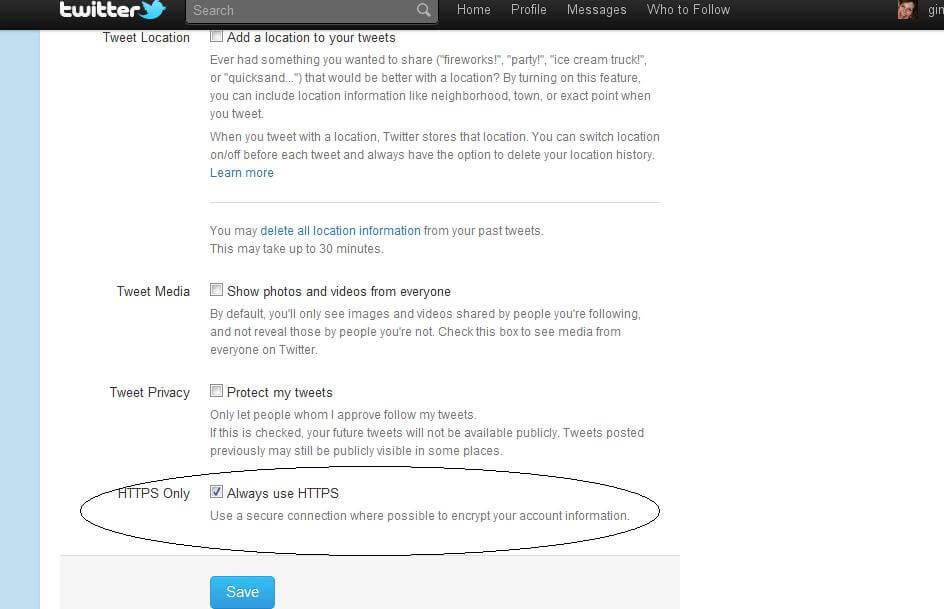
If you’re on Twitter, I recommend (if you haven’t already) getting on there and changing your settings stat.

This will encrypt your account information when you’re tweeting on an unsecured. WiFi network.

1. Log on to twitter.com.

2. In the upper right-hand corner, where you see your Twitter handle, click the triangle and scroll to settings.

3. Click settings and scroll to the bottom.

4. Click the box next to “Always use HTTPS.”

5. Click save.

6. You’ll have to re-enter your password.

Then it’s complete!

Gini Dietrich headshot.

Gini Dietrich

Founder and CEO

Gini Dietrich is the founder, CEO, and author of Spin Sucks, host of the Spin Sucks podcast, and author of Spin Sucks (the book). She is the creator of the PESO Model® and has crafted a certification for it in collaboration with the S.I. Newhouse School for Public Communication at Syracuse University. She is co-author of Marketing in the Round and co-host of The Agency Leadership podcast. She also holds “legend” status on Peloton.

Related Posts

We’re biased, but we think this is the most practical and insightful marketing, communications, and entrepreneurship blog anywhere!

Ready to Learn More?

Reach out. We’re here to help. Email us at support@spinsucks.com.